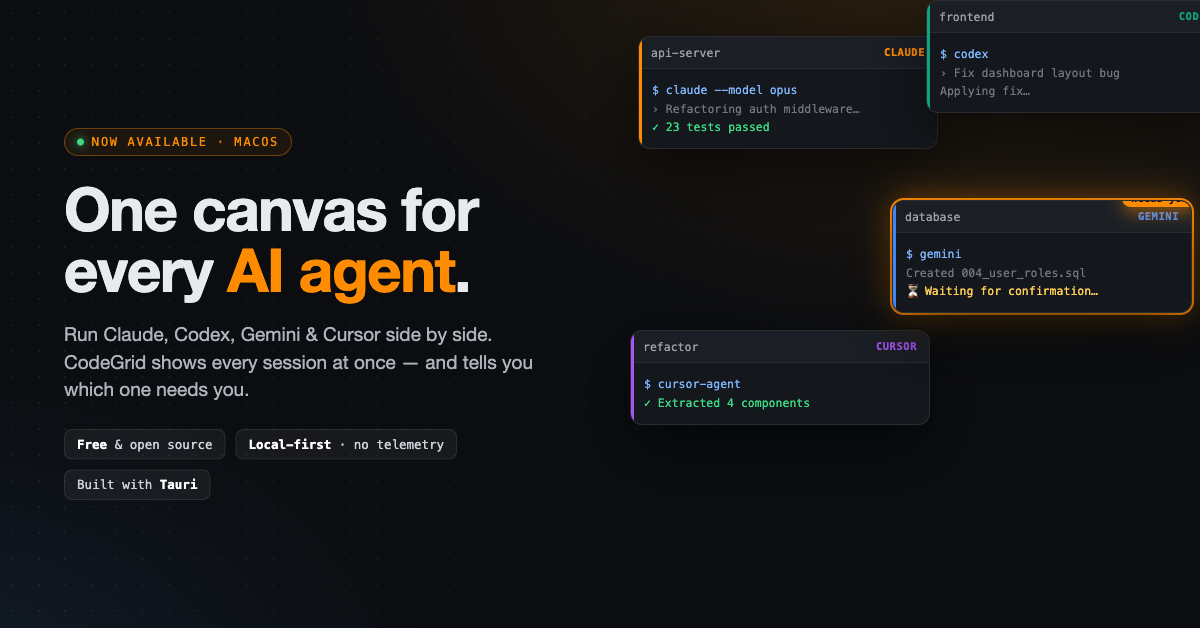
The native macOS app puts every AI coding session on a single drag-and-resize canvas and tells you which agent needs you, no tabs, no lock-in
MIAMI, FL, UNITED STATES, May 25, 2026 /EINPresswire.com/ — CodeGrid, a free and open-source native macOS app for running multiple AI coding agents in parallel, is now available. Built for developers who increasingly juggle several AI sessions at once, CodeGrid replaces the cramped tabs and split panes of traditional terminals with a single drag-and-resize canvas where every session is visible at the same time.
Over the past two years, AI coding agents have moved from novelty to daily driver. Developers no longer run one assistant — they run several, each pointed at a different part of the codebase. One agent refactors a service while another fixes a UI bug and a third writes a database migration. The model is rarely the constraint anymore. The interface is. Terminals built for a single foreground process force that work into stacked tabs and split panes, where sessions disappear the moment you look away and you discover an agent has been waiting on you for ten minutes.
CodeGrid is built for exactly this way of working. Instead of tabs, it gives every session a movable, resizable pane on an infinite canvas. Zoom out to see all of them at once; drag the active ones close together; push the idle ones to the edges. The layout is yours, and it persists.
“Once you’re running four or five AI agents at once, the bottleneck isn’t the model — it’s you, trying to keep track of which one is blocked,” said Isaac Horowitz of CodeGrid. “CodeGrid watches every session and tells you exactly which one needs you, so you’re never sitting idle on pane six because you were looking at pane two.”
That awareness is CodeGrid’s core feature. Its attention detection continuously reads every terminal and highlights the panes that are waiting — Y/N prompts, approval requests, and confirmations — across all agents at once. The result is a workspace that actively routes your attention to where it’s needed, instead of making you poll a dozen sessions by hand.
Crucially, CodeGrid does not replace the tools developers already trust. Each pane runs in its own PTY with an isolated working directory and launches the real Claude, Codex, Gemini, Cursor, or plain shell workflows users already know. There are no wrappers, no proprietary runtime, and no migration — if it runs in your terminal today, it runs in CodeGrid.
Beyond the canvas, CodeGrid bundles the surrounding tooling a multi-session workflow demands. Built-in Git and GitHub tools let developers browse, search, and clone repositories, including organization repos and move changes forward without leaving the app. A sidebar file tree and project-wide search remove the need to open a separate editor just to find a file. An embedded browser pane sits right on the canvas for previewing an app, checking docs, or reviewing a pull request alongside the terminals driving it. Saved per-project workspaces restore an entire layout in one click, and a Cmd+K command palette puts every action, switching workspaces, launching agents, running commands a keystroke away.
CodeGrid is also built to earn the trust of professional developers handling sensitive code. It is local-first by design: the app runs entirely on the user’s machine with no account, no telemetry, and no servers. Code goes straight to each agent’s own provider, and CodeGrid itself stores nothing. The application is MIT-licensed with its full source available on GitHub, so anyone can audit exactly what it does, and it ships signed and notarized by Apple with a hardened runtime.
“We wanted something we’d trust with our own work, fully open, fully local, and honest about where your code goes,” Horowitz added. “No account wall, no background uploads, nothing to take on faith. The source is right there to read.”
CodeGrid is aimed at the growing group of engineers, indie developers, and teams who treat AI agents as a parallel workforce rather than a single chat window — anyone who has felt the friction of orchestrating several capable assistants through an interface that only expected one.
CodeGrid is available now as a free download for macOS, and the full source code is available on GitHub. Built with Tauri, it ships as a lightweight native application rather than a browser wrapper. There are no paid tiers, no usage limits, and no sign-up required to get started.
Isaac Horowitz
CodeGrid
+1 917-576-3605
admin@codegrid.app
Visit us on social media:
LinkedIn
X
Legal Disclaimer:
EIN Presswire provides this news content “as is” without warranty of any kind. We do not accept any responsibility or liability
for the accuracy, content, images, videos, licenses, completeness, legality, or reliability of the information contained in this
article. If you have any complaints or copyright issues related to this article, kindly contact the author above.

Media gallery